In this part of the series, we will be implementing a more robust save system than the one we had in the previous part. As we have recently created a robust save system asset called the Bench Universal Save System for the latest part of our Metroidvania series, we are going to upgrade our save system to use it (and make the development of our save system much easier).
On top of that, to test out the save system, we are also going to implement the power-up screen into our project as well, so that players will be able to buy something with the coins they have collected.
1. Implementing Power Ups
Before we overhaul the save system, let’s implement power-ups for our game first. In Vampire Survivors, power-ups are items that you can purchase from the shop with the coins that you have accumulated.
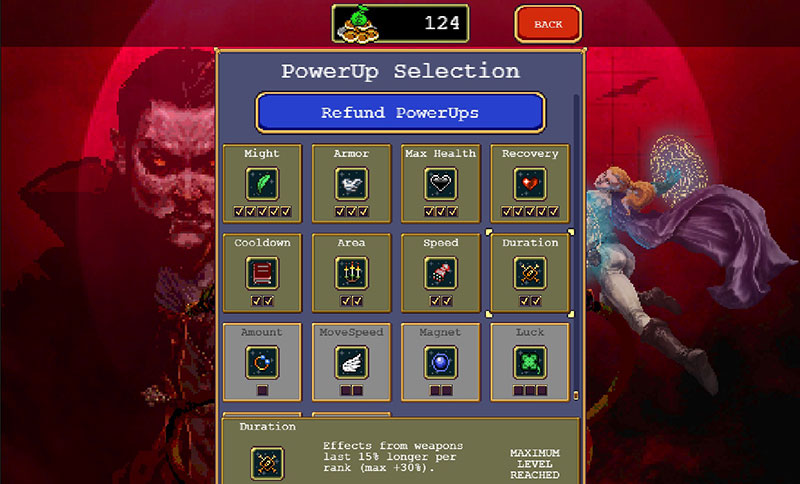
We have, in the previous part, covered how to save coins across multiple game sessions using a rudimentary save system; but as of now, in our build, there is no way for us to make use of those coins. By implementing a power-up system, that will no longer be an issue.
a. The PowerUpData scriptable object
To this end, we will create a new scriptable object called PowerUpData. This will allow us to define a set of power-ups that the player can buy and use in the game.
PowerUpData.cs
using UnityEngine;

/// <summary>
/// A specialised PassiveData class called PowerUpData, for power-ups that are purchased
/// from the Power Ups screen.
/// </summary>
[CreateAssetMenu(fileName = "Power Up Data", menuName = "2D Top-down Rogue-like/Power Up Data")]
public class PowerUpData : PassiveData
{

    public float baseCost = 200f, baseFee = 20f, feeFactor = 1.1f;

    public virtual float GetCost(int level)
    {
        return GetBaseCost(level) + GetFeeCost(level);
    }

    public virtual float GetBaseCost(int level)
    {
        if (level < 0) return 0;
        return Mathf.Floor(baseCost * (1 + level));
    }

    public virtual float GetFeeCost(int level)
    {
        if (level <= 0) return 0;
        return Mathf.Floor(baseFee * Mathf.Pow(1.1f, level));
    }

    // It works the same as the passive, but the warning message is different.
    public override Item.LevelData GetLevelData(int level)
    {
        if (level <= 1) return baseStats;

        // Pick the stats from the next level.
        if (level - 2 < growth.Length)
            return growth[level - 2];

        // Return an empty value and a warning.
        Debug.LogWarning(string.Format("Power Up doesn't have its level up stats configured for Level {0}!", level));
        return new Passive.Modifier();
    }
}
b. Key details of the PowerUpData script
The most important thing about the PowerUpData script is that it inherits from the PassiveData class that we implemented back in Part 15. The reason it is designed this way is because power-ups behave most like passives, and we want to piggyback on the functionality of passives to minimise the amount of additional code we need to write.
Beyond inheriting from PassiveData, the PowerUpData script also has 3 properties that will allow us to set the cost of the power-ups, and how this cost scales as we level up the power-up:
baseCost: This determines the amount of coins that the power-up will cost when you first buy it.baseFee: This is the amount of coins that each level will increase the base cost by, and it will rise exponentially the higher the level of the power-up we are purchasing.feeFactor: This controls how quickly the price of the power-up will increase with each successive level. At the default value of 1.1, this means that the additional fee per level increases by 10% each, and the higher you raise this value, the greater the additional fee will be at every level.
Due to these 3 variables, the PowerUpData class also contains the functions GetBaseCost(), GetFeeCost() and GetCost(). All these functions take a level as an argument, and return the cost of the power-up, basically telling you how much the power-up will cost at a given level.
We will only be using the GetCost() function in our other scripts, as it calculates both the base cost and fee cost for us, and adds them together to give us the actual cost of the power-up at a given level.
c. Creating the power-up scriptable objects
Upon adding the scriptable object into your project (I saved the script under Assets/Scripts/Passive Items), you should now be able to create PowerUpData objects in your project.
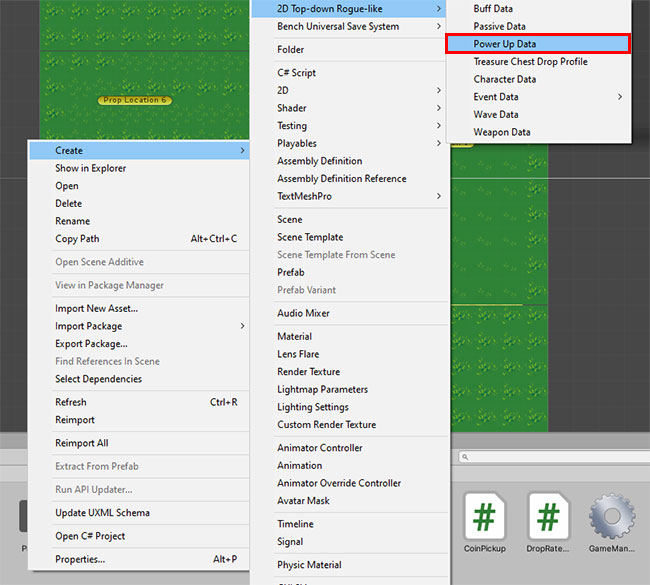
Each of these power-up data files that you create will later represent one of the purchasable objects from the power-up shop. I will be creating the list of power-ups based on the power-up list we see in the Vampire Survivors Wiki.
You can store these scriptable objects anywhere, but for the sake of keeping everything organised, I am storing them in a newly-created folder Assets/Scriptable Objects/Power Ups.
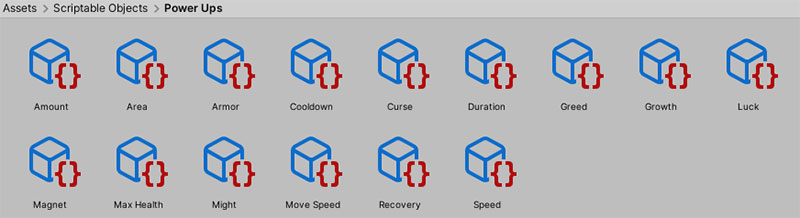
The values you have to fill in for the scriptable objects are very similar to those of the passives, with the addition of the Base Cost, Base Fee and Fee Factor attributes.
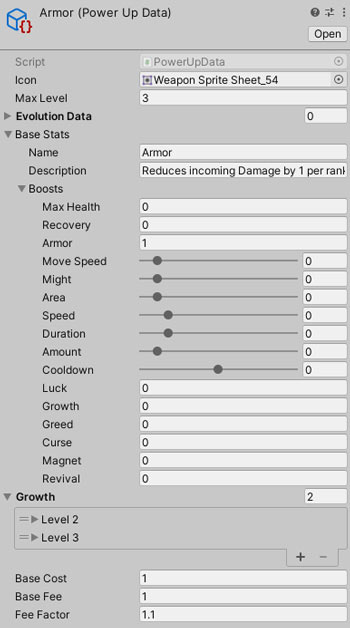
PassiveData, the Inspector interface is very similar as a result.d. Creating the PowerUp class
Last but not least, we will create a new PowerUp class as well. Just as our WeaponData scriptable objects have a Weapon class (that is used to attach the WeaponData to GameObjects in-game), and our PassiveData scriptable objects have a Passive class; our PowerUpData class has a PowerUp script as well. This will mostly be used together with the new save system later on.
PowerUp.cs
public class PowerUp : Passive
{
    [System.Serializable]
    public class Data {
        public string name;
        public int level;
        public Data(string name, int level) {
            this.name = name;
            this.level = level;
        }
    }
}
For now, because the PowerUp class inherits the Passive class, it does not need much additional code as power-ups will work very similarly to passives. We simply add a nested Data class in PowerUp (i.e. accessed by PowerUp.Data, which will be used together with the SaveManager later on.
Note that this nested Data class, although it is identified by PowerUp.Data, is different from the PowerUpData scriptable object class. This nested PowerUp.Data class will be used by the SaveManager to store the player’s save data, as opposed to storing the types of power-ups (which the scriptable object class PowerUpData is responsible for).
2. Implementing the Bench Universal Save System
Now that our power-up data structures have been set-up, we can move on to implementing our new save system. To that end, the first thing we will need to do is download and import the Bench Universal Save System asset into our project.
a. Downloading the asset
- Go to the asset page with your Unity project open: Bench Universal Save System
- Click on Add to My Assets on the asset store page. This should add the asset into your Package Manager in Unity.
- Now, go to Window > Package Manager and select My Assets from the top left dropdown. In there, find the Bench Universal Save System and click on Download to import it into your project.
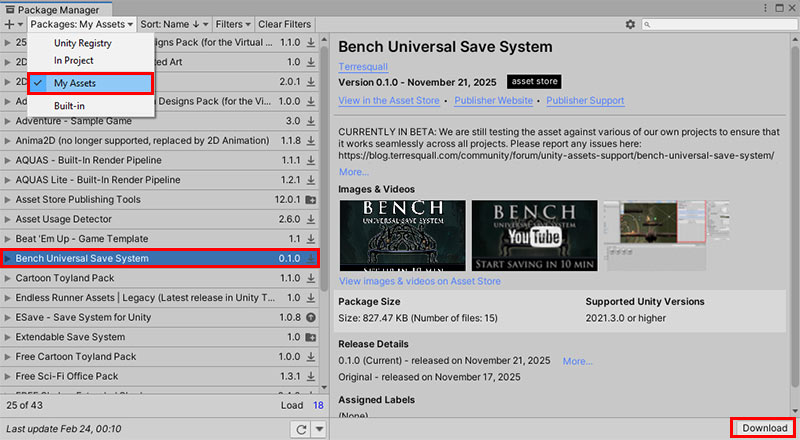
Once done, please give the Bench Universal Save System user guide a quick read. It takes no more than 10 minutes, and it will help you understand the codes we are going to implement below.
c. Updating the SaveManager
With the asset imported, let’s retire our old SaveManager script by renaming it the OldSaveManager, and labelling it as obsolete:
OldSaveManager.cs
using System.Collections;
using System.Collections.Generic;
using System.Drawing;
using System.IO;
using UnityEngine;

/// <summary>
/// A simple SaveManager designed to save the total number of coins the player has.
/// In later parts, this will be used to store all the player's save data, but we are
/// keeping it simple for now.
/// </summary>
[System.Obsolete]
public class OldSaveManager
{
    public class GameData
    {
        public float coins;
    }

    const string SAVE_FILE_NAME = "SaveData.json";

    static GameData lastLoadedGameData;
    public static GameData LastLoadedGameData
    {
        get
        {
            if (lastLoadedGameData == null) Load();
            return lastLoadedGameData;
        }
    }

    public static string GetSavePath()
    {
        return string.Format("{0}/{1}", Application.persistentDataPath, SAVE_FILE_NAME);
    }

    // This function, when called without an argument, will save into the last loaded
    // game file (this is how you should be calling Save() 99% of the time.
    // But you can optionally also provide an argument to it to if you want to overwrite the save completely.
    public static void Save(GameData data = null)
    {
        // Ensures that the save always works.
        if (data == null)
        {
            // If there is no last loaded game, we load the game to populate
            // lastLoadedGameData first, then we save.
            if (lastLoadedGameData == null) Load();
            data = lastLoadedGameData;
        }
        File.WriteAllText(GetSavePath(), JsonUtility.ToJson(data));
    }

    public static GameData Load(bool usePreviousLoadIfAvailable = false)
    {
        // usePreviousLoadIfAvailable is meant to speed up load calls,
        // since we don't need to read the save file every time we want to access data.
        if (usePreviousLoadIfAvailable && lastLoadedGameData != null)
            return lastLoadedGameData;

        // Retrieve the load in the hard drive.
        string path = GetSavePath();
        if (File.Exists(path))
        {
            string json = File.ReadAllText(path);
            lastLoadedGameData = JsonUtility.FromJson<GameData>(json);
            if (lastLoadedGameData == null) lastLoadedGameData = new GameData();
        }
        else
        {
            lastLoadedGameData = new GameData();
        }
        return lastLoadedGameData;
    }
}
Then, we’ll create a new SaveManager script that we will be using to replace the old one:
SaveManager.cs
using System;
using System.Collections.Generic;
using System.Linq;
using Terresquall;
using UnityEngine;

public class SaveManager : PersistentObject {
    static SaveManager _instance;
    public static SaveManager Instance {
        get {
            if (_instance == null) {
                _instance = FindObjectOfType<SaveManager>();
            }
            return _instance;
        }
    }

    public event Action OnCoinsChanged;
    public event Action OnPowerUpsChanged;

    protected SaveData savedData = new SaveData();
    public SaveData SavedData => savedData;

    void Awake() {
        if (_instance) {
            Debug.LogWarning("Multiple instances of SaveManager found! Removing extra instance.");
            Destroy(this);
            return;
        }

        Time.timeScale = 1;
        if (Bench.SlotHasSave(Bench.currentSlot))
            Bench.LoadGame(Bench.currentSlot);
        else
            Bench.SaveGame(true);
    }

    void OnDestroy() {
        if (_instance == this) _instance = null;
    }

    public float GetTotalCoins() { return savedData.totalCoins; }

    public void AddCoins(float amount)
    {
        savedData.totalCoins += amount;
        OnCoinsChanged?.Invoke();
    }

    // Whenever we want to buy an item, we call this function to
    // see if we have enough coins. Returns true if so, false otherwise.
    public bool TrySpendCoins(float amount)
    {
        if (amount <= 0) return true;
        if (savedData.totalCoins >= amount) {
            savedData.totalCoins -= amount;
            OnCoinsChanged?.Invoke();
            Bench.SaveGame(Bench.currentSlot, true);
            return true;
        }
        return false;
    }

    // Gets the level of a selected power up.
    public int GetLevel(PowerUpData data)
    {
        if (Find(data) == null) return 0;
        PowerUp.Data powerUp = Find(data);
        if (powerUp != null) return powerUp.level;
        return 0;
    }

    public void SetLevel(PowerUpData data, int level)
    {
        if (data == null) return;

        // Clamps the level range and finds an existing assigned powerup.
        int clampedLevel = Mathf.Clamp(level, 0, data.maxLevel);
        PowerUp.Data existing = Find(data);

        // Sets the level (and adds the power up if not assigned).
        if (clampedLevel > 0) {
            if (existing != null)
                existing.level = clampedLevel;
            else
                savedData.powerUps.Add(new PowerUp.Data(data.name, clampedLevel));
        } else if (existing != null) {
            savedData.powerUps.Remove(existing);
        }

        OnPowerUpsChanged?.Invoke();
    }

    // Finds and returns any power up data.
    public PowerUp.Data Find(PowerUpData data)
    {
        if (data == null) return null;
        return savedData.powerUps.FirstOrDefault(e => e.name == data.name && e.level > 0);
    }

    // Attempts to level up a power up.
    public bool LevelUp(PowerUpData powerUp, int amount = 1)
    {
        if (powerUp == null) return false;

        int currentLevel = GetLevel(powerUp);
        if (currentLevel >= powerUp.maxLevel) return false;

        SetLevel(powerUp, currentLevel + amount);
        return true;
    }

    public List<PowerUp.Data> GetAllPowerUps()
    {
        return new List<PowerUp.Data>(savedData.powerUps);
    }

    public void ClearAllPowerUps()
    {
        savedData.powerUps.Clear();
        OnPowerUpsChanged?.Invoke();
    }

    [Serializable]
    public new class SaveData : PersistentObject.SaveData
    {
        public float totalCoins;
        public List<PowerUp.Data> powerUps = new List<PowerUp.Data>();
    }

    public override bool CanSave()
    {
        return base.CanSave();
    }

    public override PersistentObject.SaveData Save()
    {
        if (!CanSave())
        {
            Debug.LogWarning("SaveManager cannot save!");
            return null;
        }

        return savedData;
    }

    public override bool Load(PersistentObject.SaveData data) {
        if (data == null)
        {
            savedData = new SaveData {
                totalCoins = 0,
                powerUps = new List<PowerUp.Data>()
            };
            Debug.LogWarning("No save data found!");
            return false;
        }

        savedData = data as SaveData;
        if (savedData == null)
        {
            Debug.LogError("Failed to cast SaveData!");
            return false;
        }

        OnCoinsChanged?.Invoke();
        OnPowerUpsChanged?.Invoke();

        return true;
    }
}
d. Explaining the updated SaveManager
To understand how the newly-replaced SaveManager script works, you’ll first need to understand how saving and loading works using the Bench asset. In a nutshell, the class needs to inherit from PersistentObject, and have a Save(), Load() and a nested SaveData class defined.
On top of these functions, the SaveManager is also made responsible for tracking the data stored inside its SaveData nested class, i.e.:
- The total number of coins the player has, and;
- The power-ups that the player has bought.
As such, the SaveManager has handful of functions defined in the class as well, which allows us to manage the number of coins the player holds:
GetTotalCoins(): Allows us to check how many coins are in the current save file.AddCoins(): Allows us to add coins to the total coin pile, which will be saved into the save file.TrySpendCoins(): This allows us to attempt to spend a given number of coins, and returnstrueif we have enough coins; andfalseotherwise. This is the function that our shop will call later to verify if there are enough coins the user can spend, so that we can determine if we want to apply the power-up that the user selects.
Additionally, the SaveManager also allows us to manage which power-ups the player has activated:
GetLevel()/SetLevel(): Allows us to check or set the current level of a given power-up. In the case ofSetLevel(), if the user doesn’t own the power-up at all, it is also responsible for giving the player the power-up.LevelUp(): Allows us to increase the level of an existing power-up. Also adds the power-up to the player if the power-up isn’t owned at all.GetAllPowerUps(): This gives us a list of all the power-ups the player owns.ClearAllPowerUps(): This empties the list of power-ups that the player owns.Find(): Allows us to find the save data of a specific type of power-up.
All the coin and power-up functions above are specifically designed to be used with our power-up screen later on, so if you don’t fully understand some of the functionalities above, read on and implement the power-up screen first—you’ll get a hang of it later on.
Notice that in the Start() function, there is also code to check whether there is an existing save. This code either loads the existing save immediately, or tries to save the game (i.e. create a new save file) if no saves exist. This is necessary, because it initialises the SaveManager with values, as coins and power-ups are persistent through the game.
3. Creating the power-up shop scene
Now that the power-up scripts and assets, as well as the Bench Universal Save System have been set up, we’ll need to create the scene that the user can go to for buying power-ups.
a. Setting up the power-up UI
Since this power-up screen is quite similar to some of the screens that we have already created, we will duplicate our existing Character Select screen from Part 24 as a starting point. To do so, select the Scene file and press Ctrl + D, then name the newly-duplicated scene Power Ups Screen.
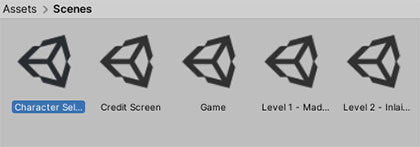
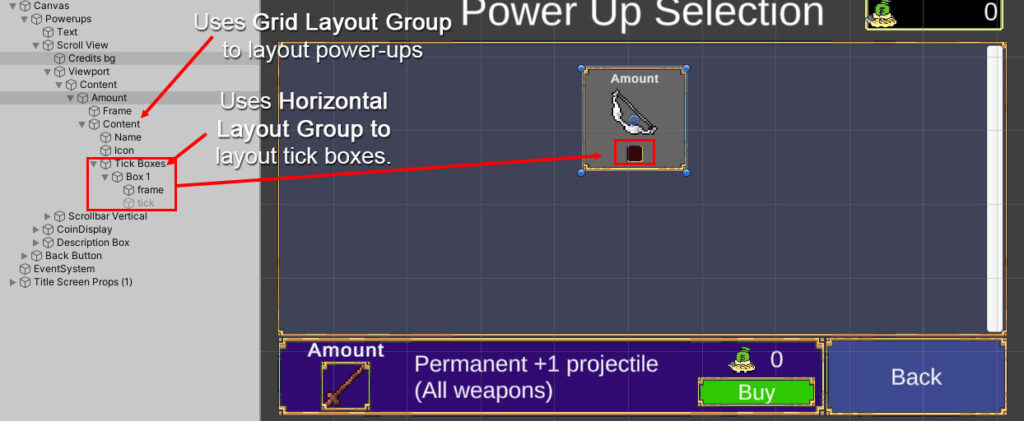
Reorganise the UI in your new Scene so that it looks like this:
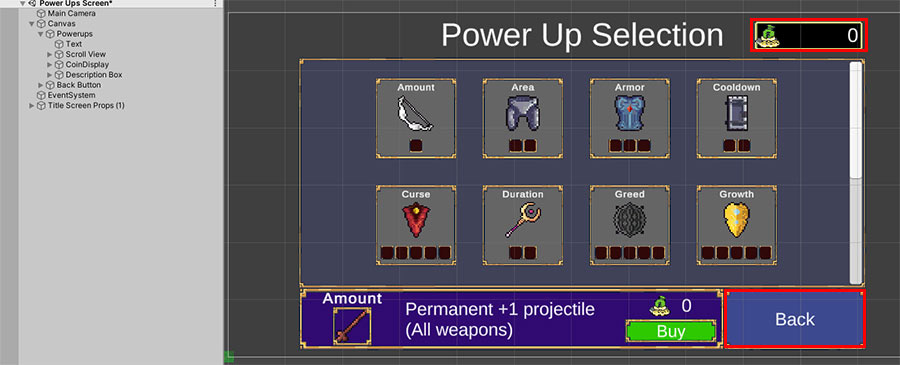
As for the actual power-ups inside the Scroll View, just create a single power-up for now (we will be populating the rest of the power-ups via a script later). Make sure that your layout can accommodate having multiple tick-boxes as well through the use of a Horizontal Layout Group; the Scroll View itself should also be able to automatically layout your power-ups through the use of a Grid Layout Group (you should already have this if you are duplicating the Character Select screen).
b. The UIPowerSelector script
To provide functionality to the power-up selection screen, we create a new UIPowerSelector script, just like we created the UICharacterSelector and UILevelSelector scripts previously.
UIPowerSelector.cs
using System.Linq;
using System.Collections.Generic;
using UnityEngine;
using UnityEngine.UI;
using Terresquall;
using UnityEngine.EventSystems;

#if UNITY_EDITOR
using UnityEditor;
#endif
using TMPro;

[RequireComponent(typeof(ToggleGroup))]
public class UIPowerSelector : MonoBehaviour
{
    public PowerUpData defaultPowerUp;
    public static PowerUpData selected;

    [Header("Template")]
    public Toggle toggleTemplate;
    [Tooltip("Name of tick container (e.g., 'Tick Boxes')")]
    public string tickContainerName = "Tick Boxes";
    [Tooltip("Name pattern for tick images (e.g., 'tick')")]
    public string tickImageName = "tick";

    Dictionary<PowerUpData, List<Image>> cachedTicks = new Dictionary<PowerUpData, List<Image>>();
    Dictionary<PowerUpData, Toggle> cachedToggleButtons = new Dictionary<PowerUpData, Toggle>();

    private int purchasedLevel = 0;
    private int previewLevel = 1;

    [Header("Description Box")]
    public TextMeshProUGUI powerName;
    public TextMeshProUGUI powerDescription;
    public Image selectedPowerIcon;
    public TextMeshProUGUI powerPrice;
    public Button buyButton;

    void Start() {
        if (SaveManager.Instance != null)
        {
            SaveManager.Instance.OnPowerUpsChanged += SyncTicksForAll;
            SaveManager.Instance.OnPowerUpsChanged += RefreshUIAfterLoad;
        }

        SyncTicksForAll();

        if (defaultPowerUp)
            Select(defaultPowerUp);

    }

    void OnDestroy()
    {
        if (SaveManager.Instance != null)
        {
            SaveManager.Instance.OnPowerUpsChanged -= SyncTicksForAll;
            SaveManager.Instance.OnPowerUpsChanged -= RefreshUIAfterLoad;
        }
    }
    void RefreshUIAfterLoad()
    {
        if (selected != null)
        {
            purchasedLevel = SaveManager.Instance.GetLevel(selected);
            previewLevel = Mathf.Clamp(purchasedLevel + 1, 1, selected.maxLevel);
            RefreshUI();
        }
    }

    Toggle FindToggle(PowerUpData powerUp)
    {
        if (cachedToggleButtons.ContainsKey(powerUp))
            return cachedToggleButtons[powerUp];

        foreach (Transform child in transform)
        {

            if (child.name == powerUp.name)
            {
                if(child.TryGetComponent(out Toggle t))
                {
                    cachedToggleButtons[powerUp] = t;
                    return t;
                }

                return null;
            }
        }

        Debug.LogWarning($"Could not find toggle button for PowerUp: {powerUp.name}");
        return null;
    }

    List<Image> FindTicks(PowerUpData powerUp)
    {

        if (cachedTicks.ContainsKey(powerUp))
            return cachedTicks[powerUp];

        List<Image> ticks = new List<Image>();

        Toggle toggleButton = FindToggle(powerUp);
        if (toggleButton == null)
            return ticks;

        Transform content = toggleButton.transform.Find("Content");

        if (content == null)
        {
            Debug.LogWarning($"Could not find 'Content' under toggle button: {powerUp.name}");
            return ticks;
        }

        Transform tickBoxesContainer = content.Find(tickContainerName);
        if (tickBoxesContainer == null)
        {
            Debug.LogWarning($"Could not find '{tickContainerName}' under {powerUp.name}/Content");
            return ticks;
        }

        foreach (Transform box in tickBoxesContainer)
        {
            foreach (Transform child in box)
            {
                if (child.name.ToLower().Contains(tickImageName.ToLower()))
                {
                    Image img = child.GetComponent<Image>();
                    if (img != null)
                    {
                        ticks.Add(img);
                    }
                }
            }
        }

        cachedTicks[powerUp] = ticks;

        Debug.Log($"Found {ticks.Count} ticks for {powerUp.name}");
        return ticks;
    }

    public void SyncTicksForAll()
    {
        if (SaveManager.Instance == null)
        {
            Debug.LogWarning("SaveManager is not available!");
            return;
        }

#if UNITY_EDITOR
        PowerUpData[] allPowerUps = GetAllPowerUps();
        foreach (PowerUpData powerUp in allPowerUps)
        {
            SyncTicks(powerUp);
        }
#else

        if (selected != null)
        {
            SyncTicksForPowerUp(selected);
        }
#endif
    }

    void SyncTicks(PowerUpData powerUp)
    {
        if (powerUp == null) return;

        int currentLevel = SaveManager.Instance.GetLevel(powerUp);
        List<Image> ticks = FindTicks(powerUp);

        for (int i = 0; i < ticks.Count; i++)
        {
            if (ticks[i] != null)
            {
                ticks[i].gameObject.SetActive(i < currentLevel);
            }
        }
    }

    public void Select(PowerUpData powerUp)
    {
        if (!powerUp) return;

        selected = powerUp;

        purchasedLevel = SaveManager.Instance.GetLevel(powerUp);
        previewLevel = Mathf.Clamp(purchasedLevel + 1, 1, selected.maxLevel);

        RefreshUI();
    }

    void RefreshUI()
    {
        if (!selected) return;

        Item.LevelData levelData;

        if (purchasedLevel >= selected.maxLevel)
        {
            levelData = selected.GetLevelData(selected.maxLevel);
            powerPrice.text = "MAX";

            if (buyButton != null)
                buyButton.gameObject.SetActive(false);
        }
        else
        {
            levelData = selected.GetLevelData(previewLevel);

            float cost = selected.GetCost(previewLevel);
            powerPrice.text = cost.ToString("0");

            if (buyButton != null)
                buyButton.gameObject.SetActive(true);
        }

        powerName.text = selected.name;
        powerDescription.text = levelData.description;
        selectedPowerIcon.sprite = selected.icon;

        UpdateLevelTicks();
    }

    void UpdateLevelTicks()
    {
        if (!selected) return;

        List<Image> ticks = FindTicks(selected);

        for (int i = 0; i < ticks.Count; i++)
        {
            if (ticks[i] != null)
            {
                ticks[i].gameObject.SetActive(i < purchasedLevel);
            }
        }
    }

    public void Buy()
    {
        if (!selected) return;

        if (purchasedLevel >= selected.maxLevel)
        {
            powerPrice.text = "MAX";
            if (buyButton != null) buyButton.gameObject.SetActive(false);
            return;
        }

        float cost = selected.GetCost(previewLevel);
        if (!SaveManager.Instance.TrySpendCoins(cost))
        {
            Debug.Log("Not enough coins to buy this power up!");
            return;
        }

        SaveManager.Instance.LevelUp(selected);

        purchasedLevel = SaveManager.Instance.GetLevel(selected);
        previewLevel = Mathf.Clamp(purchasedLevel + 1, 1, selected.maxLevel);

        RefreshUI();

        Bench.SaveGame(Bench.currentSlot, true);
    }

    public static PowerUpData GetSelected()
    {
        return selected;
    }

#if UNITY_EDITOR
    public static PowerUpData[] GetAllPowerUps()
    {
        List<PowerUpData> powerUps = new List<PowerUpData>();
        string[] guids = AssetDatabase.FindAssets("t:PowerUpData");

        foreach (string guid in guids)
        {
            string path = AssetDatabase.GUIDToAssetPath(guid);
            PowerUpData powerUp = AssetDatabase.LoadAssetAtPath<PowerUpData>(path);
            if (powerUp != null)
                powerUps.Add(powerUp);
        }

        return powerUps.ToArray();
    }
#endif
}
The UIPowerSelector script works very similarly to the UICharacterSelector and UILevelSelector scripts—the functions contained within are either designed to be used by the in-game UI elements (such as the buttons and toggles), or by the Inspector script.
In the script, the functions of note are SyncTicksForAll() and RefreshUIAfterLoad(). These functions bind to the OnPowerUpsChanged event declared in SaveManager script, allowing it to update the tick boxes whenever the user buys or resets their power-ups:
public event Action OnCoinsChanged;
public event Action OnPowerUpsChanged;
Events are simply functions that can be called, but instead of being defined like regular functions, events allow other scripts to attach their own functions to it, so that when these events fire, all the functions that are attached to the event also fire.
In the UIPowerSelector script, we hook the aforementioned functions to the aforementioned events when the power selector screen is created, and remove the aforementioned function when the screen is destroyed:
void Start() {
    if (SaveManager.Instance != null)
    {
        SaveManager.Instance.OnPowerUpsChanged += SyncTicksForAll;
        SaveManager.Instance.OnPowerUpsChanged += RefreshUIAfterLoad;
    }

    SyncTicksForAll();

    if (defaultPowerUp)
        Select(defaultPowerUp);

}

void OnDestroy()
{
    if (SaveManager.Instance != null)
    {
        SaveManager.Instance.OnPowerUpsChanged -= SyncTicksForAll;
        SaveManager.Instance.OnPowerUpsChanged -= RefreshUIAfterLoad;
    }
}
c. Assigning UI button actions
With the UIPowerSelector script now created, you can attach the component to the container in your scroll view that directly contains the toggle box for the power-ups in the UI that you created previously:
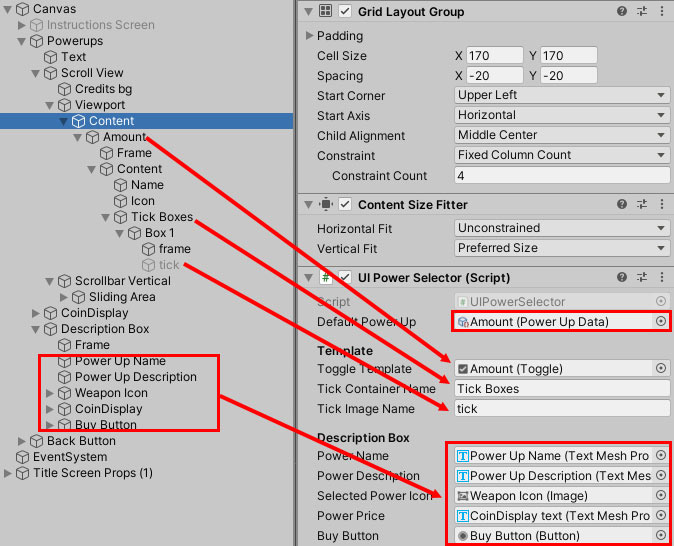
UIPowerSelector as well. Be sure to assign a scriptable object (from your Project window) to the Default Power Up field too.Once you have set this up, you will also need to hook actions to the various buttons in your UI elements:
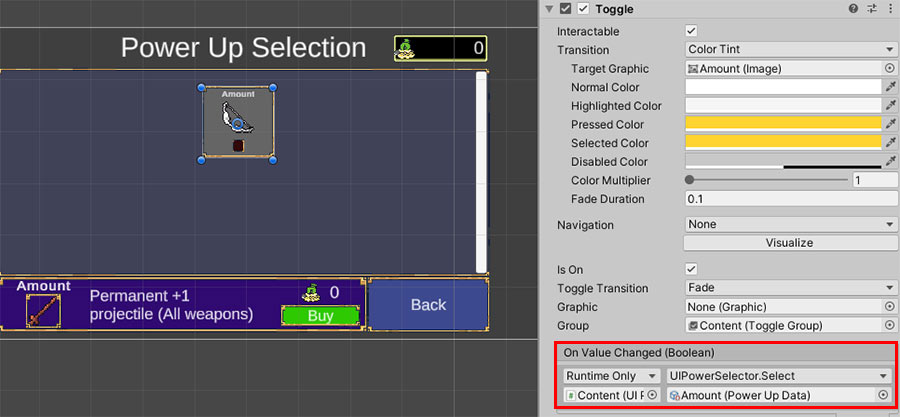
Select() function from the UIPowerSelector.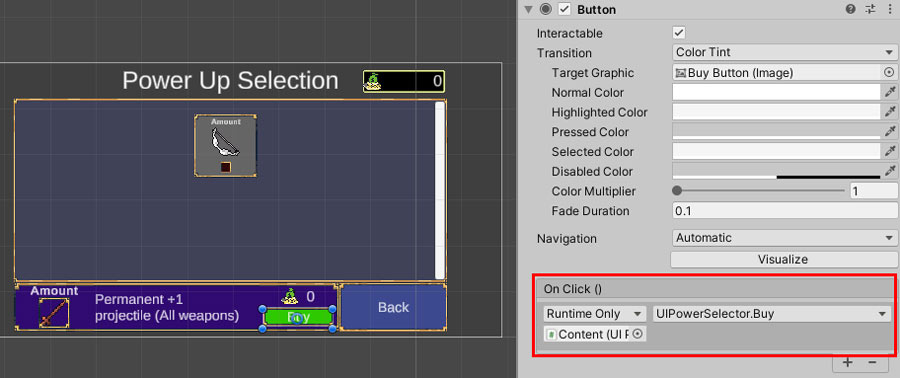
Buy() function.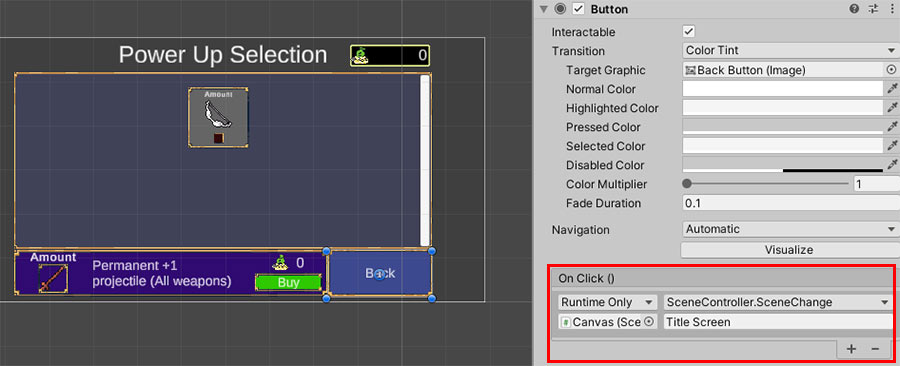
SceneChange() function from SceneController or UILevelSelector.With the actions set up, you should now be able to buy power-ups, as long as you have the coins to be able to afford them. Before you begin testing, however, we will also add a custom Inspector to the UIPowerSelector to automate the filling up of the power-ups in the selection screen.
d. Custom UIPowerSelectorEditor Inspector

We’ll create a UIPowerSelectorEditor script as well, and attach it to the UIPowerSelector component. Since this is an Editor script, make sure to add it into a folder called Editor, otherwise it will break your game when building.
UIPowerSelectorEditor.cs
using UnityEditor;
using UnityEngine;
using UnityEngine.UI;
using TMPro;
using UnityEditor.Events;
using System.Collections.Generic;

[DisallowMultipleComponent]
[CustomEditor(typeof(UIPowerSelector))]
public class UIPowerSelectorEditor : Editor
{
    UIPowerSelector selector;

    void OnEnable()
    {
        // Point to the UIPowerSelector when it's in the inspector so its variables can be accessed.
        selector = target as UIPowerSelector;
    }

    public override void OnInspectorGUI()
    {
        // Create a button in the inspector with the name, that creates the toggle templates when clicked.
        base.OnInspectorGUI();
        if (GUILayout.Button("Generate Selectable PowerUps"))
        {
            CreateTogglesForPowerUpData();
        }
    }

    public void CreateTogglesForPowerUpData()
    {

        // Find the template toggle (first child or a specific template)
        Toggle toggleTemplate = selector.toggleTemplate;
        if (toggleTemplate == null)
        {
            Debug.LogWarning("No Toggle template found under PowerUp UI Container.");
            return;
        }

        // Loop through all the children of the container,
        // and deleting everything under it except the template.
        for (int i = selector.transform.childCount - 1; i >= 0; i--)
        {
            Transform child = selector.transform.GetChild(i);
            Toggle tog = child.GetComponent<Toggle>();
            if (tog == toggleTemplate) continue;
            Undo.DestroyObjectImmediate(child.gameObject); // Record the action so we can undo.
        }

        // Record the changes made to the UIPowerSelector component as undoable
        Undo.RecordObject(selector, "Updates to UIPowerSelector.");

        PowerUpData[] powerUps = UIPowerSelector.GetAllPowerUps();

        // For every power up data asset in the project, we create a toggle for them in the power selector.
        for (int i = 0; i < powerUps.Length; i++)
        {
            Toggle tog;
            if (i == 0)
            {
                tog = toggleTemplate;
                Undo.RecordObject(tog, "Modifying the template.");
            }
            else
            {
                tog = Instantiate(toggleTemplate, selector.transform); // Create a toggle of the current power up as a child of the container.
                Undo.RegisterCreatedObjectUndo(tog.gameObject, "Created a new toggle.");
            }
            tog.group = selector.GetComponent<ToggleGroup>();

            // Set the toggle name to match the PowerUpData name
            tog.gameObject.name = powerUps[i].name;

            // Find and assign the power up icon
            Transform content = tog.transform.Find("Content");
            if (content != null)
            {
                // Find and set the icon
                Transform iconTransform = content.Find("Icon");
                if (iconTransform && iconTransform.TryGetComponent(out Image icon))
                {
                    icon.sprite = powerUps[i].icon;
                }

                // Find and set the name (if you have a text element for it)
                Transform nameTransform = content.Find("Name");
                if (nameTransform && nameTransform.TryGetComponent(out TextMeshProUGUI nameText))
                {
                    nameText.text = powerUps[i].name;
                }

                // Handle tick boxes based on maxLevel
                Transform tickBoxesContainer = content.Find(selector.tickContainerName);
                if (tickBoxesContainer != null)
                {
                    // Clear existing tick boxes (except the first one which we'll use as template)
                    Transform boxTemplate = tickBoxesContainer.childCount > 0 ? tickBoxesContainer.GetChild(0) : null;

                    if (boxTemplate != null)
                    {
                        // Remove all existing boxes except the template
                        for (int j = tickBoxesContainer.childCount - 1; j >= 1; j--)
                        {
                            Undo.DestroyObjectImmediate(tickBoxesContainer.GetChild(j).gameObject);
                        }

                        // Create the correct number of tick boxes based on maxLevel
                        int maxLevel = powerUps[i].maxLevel;

                        for (int j = 0; j < maxLevel; j++)
                        {
                            Transform box;
                            if (j == 0)
                            {
                                box = boxTemplate;
                                Undo.RecordObject(box, "Modifying tick box template.");
                            }
                            else
                            {
                                box = Instantiate(boxTemplate, tickBoxesContainer);
                                Undo.RegisterCreatedObjectUndo(box.gameObject, "Created tick box.");
                            }

                            box.gameObject.name = $"Box {j + 1}";

                            // Ensure the tick is initially disabled
                            Transform tick = box.Find(selector.tickImageName);
                            if (tick != null)
                            {
                                tick.gameObject.SetActive(false);
                            }
                        }
                    }
                    else
                    {
                        Debug.LogWarning($"No tick box template found under {selector.tickContainerName} for {powerUps[i].name}");
                    }
                }
            }

            // Remove all select events and add our own event that checks which power up toggle was clicked.
            for (int j = tog.onValueChanged.GetPersistentEventCount() - 1; j >= 0; j--)
            {
                if (tog.onValueChanged.GetPersistentMethodName(j) == "Select")
                {
                    UnityEventTools.RemovePersistentListener(tog.onValueChanged, j);
                }
            }
            UnityEventTools.AddObjectPersistentListener(tog.onValueChanged, selector.Select, powerUps[i]);
        }

        // Registers the changes to be saved when done.
        EditorUtility.SetDirty(selector);

        Debug.Log($"Successfully generated {powerUps.Length} power-up toggles!");
    }
}
This script simply adds a button to the Inspector for the UIPowerSelector component, so that we can click on the button to automatically search the project for all PowerUpData scriptable object assets and insert them into the power selector UI.
e. Testing saved power-ups
Once you are done setting up the UI, try playing the Power Up Screen and buying items on it, then unplaying the scene.
If your save system is working, the items that you have bought should still be there, even after you unplay and replay the game.
4. Applying power-ups to the level
Now that your power-ups are saving properly when you buy them on the screen, we’ll need to update the PlayerInventory and PlayerStats script to take these power-ups into account.
a. Adding power-up support to PlayerInventory
The PlayerInventory script currently manages the player’s weapons and passives. We’ll now need to update it so that we can add power-ups to it as well.
PlayerInventory.cs
using System;
using System.Collections.Generic;
using UnityEngine;
using UnityEngine.UI;
using TMPro;
using System.Linq;

public class PlayerInventory : MonoBehaviour
{
    [System.Serializable]
    public class Slot
    {
        public Item item;

        public void Assign(Item assignedItem)
        {
            item = assignedItem;
            if (item is Weapon)
            {
                Weapon w = item as Weapon;
            }
            else
            {
                Passive p = item as Passive;
            }
            Debug.Log(string.Format("Assigned {0} to player.", item.name));
        }

        public void Clear()
        {
            item = null;
        }

        public bool IsEmpty() { return item == null; }
    }

    public List<Slot> weaponSlots = new List<Slot>(6);
    public List<Slot> passiveSlots = new List<Slot>(6);
    public List<PowerUp> powerUps = new List<PowerUp>();
    public UIInventoryIconsDisplay weaponUI, passiveUI;

    [Header("UI Elements")]
    public List<WeaponData> availableWeapons = new List<WeaponData>();    //List of upgrade options for weapons
    public List<PassiveData> availablePassives = new List<PassiveData>(); //List of upgrade options for passive items
    public List<PowerUpData> availablePowerUps = new List<PowerUpData>();

    public UIUpgradeWindow upgradeWindow;

    PlayerStats player;

    void Start()
    {
        player = GetComponent<PlayerStats>();

        if(SaveManager.Instance && SaveManager.Instance.SavedData.powerUps.Count > 0)
        {
            foreach (PowerUp.Data data in SaveManager.Instance.SavedData.powerUps)
                Add(data);
        }
    }

    // Checks if the inventory has an item of a certain type.
    public bool Has(ItemData type) { return Get(type); }

    public Item Get(ItemData type)
    {
        if (type is WeaponData) return Get(type as WeaponData);
        else if (type is PowerUpData) return Get(type as PowerUpData);
        else if (type is PassiveData) return Get(type as PassiveData);
        return null;
    }

    public PowerUp Get(PowerUpData type) {
        foreach (PowerUp p in powerUps) {
            if (p.data == type) return p;
        }
        return null;
    }

    public Passive Get(PassiveData type)
    {
        if (type is PowerUpData) Get(type as PowerUpData);
        foreach (Slot s in passiveSlots)
        {
            Passive p = s.item as Passive;
            if (p && p.data == type)
                return p;
        }
        return null;
    }

    // Find a weapon of a certain type in the inventory.
    public Weapon Get(WeaponData type)
    {
        foreach (Slot s in weaponSlots)
        {
            Weapon w = s.item as Weapon;
            if (w && w.data == type)
                return w;
        }
        return null;
    }

    // Removes a weapon of a particular type, as specified by .
    public bool Remove(WeaponData data, bool removeUpgradeAvailability = false)
    {
        // Remove this weapon from the upgrade pool.
        if (removeUpgradeAvailability) availableWeapons.Remove(data);

        for (int i = 0; i < weaponSlots.Count; i++)
        {
            Weapon w = weaponSlots[i].item as Weapon;
            if (w.data == data)
            {
                weaponSlots[i].Clear();
                w.OnUnequip();
                Destroy(w.gameObject);
                return true;
            }
        }

        return false;
    }

    // Removes a passive of a particular type, as specified by .
    public bool Remove(PassiveData data, bool removeUpgradeAvailability = false)
    {
        if (data is PowerUpData) return Remove(data as PowerUpData);

        // Remove this passive from the upgrade pool.
        if (removeUpgradeAvailability) availablePassives.Remove(data);

        for (int i = 0; i < weaponpassiveSlots.Count; i++)
        {
            Passive p = weaponpassiveSlots[i].item as Passive;
            if (p.data == data)
            {
                weaponpassiveSlots[i].Clear();
                p.OnUnequip();
                Destroy(p.gameObject);
                return true;
            }
        }

        return false;
    }

    // If an ItemData is passed, determine what type it is and call the respective overload.
    // We also have an optional boolean to remove this item from the upgrade list.
    public bool Remove(ItemData data, bool removeUpgradeAvailability = false)
    {
        if (data is PowerUpData) return Remove(data as PowerUpData, removeUpgradeAvailability);
        else if (data is PassiveData) return Remove(data as PassiveData, removeUpgradeAvailability);
        else if (data is WeaponData) return Remove(data as WeaponData, removeUpgradeAvailability);
        return false;
    }

    // Finds an empty slot and adds a weapon of a certain type, returns
    // the slot number that the item was put in.
    public int Add(WeaponData data, bool updateUI = true)
    {
        int slotNum = -1;

        // Try to find an empty slot.
        for (int i = 0; i < weaponSlots.Capacity; i++)
        {
            if (weaponSlots[i].IsEmpty())
            {
                slotNum = i;
                break;
            }
        }

        // If there is no empty slot, exit.
        if (slotNum < 0) return slotNum;

        // Otherwise create the weapon in the slot.
        // Get the type of the weapon we want to spawn.
        Type weaponType = Type.GetType(data.behaviour);

        if (weaponType != null)
        {
            // Spawn the weapon GameObject.
            GameObject go = new GameObject(data.baseStats.name + " Controller");
            Weapon spawnedWeapon = (Weapon)go.AddComponent(weaponType);
            spawnedWeapon.transform.SetParent(transform); //Set the weapon to be a child of the player
            spawnedWeapon.transform.localPosition = Vector2.zero;
            spawnedWeapon.Initialise(data);
            spawnedWeapon.OnEquip();

            // Assign the weapon to the slot.
            weaponSlots[slotNum].Assign(spawnedWeapon);
            if(updateUI) weaponUI.Refresh();

            // Close the level up UI if it is on.
            if (GameManager.instance != null && GameManager.instance.choosingUpgrade)
                GameManager.instance.EndLevelUp();

            return slotNum;
        }
        else
        {
            Debug.LogWarning(string.Format(
                "Invalid weapon type specified for {0}.",
                data.name
            ));
        }

        return -1;
    }

    // Finds an empty slot and adds a passive of a certain type, returns
    // the slot number that the item was put in.
    public int Add(PassiveData data, bool updateUI = true)
    {
        if (data is PowerUpData) Add(data as PowerUpData, 1);

        int slotNum = -1;

        // Try to find an empty slot.
        for (int i = 0; i < passiveSlots.Capacity; i++)
        {
            if (passiveSlots[i].IsEmpty())
            {
                slotNum = i;
                break;
            }
        }

        // If there is no empty slot, exit.
        if (slotNum < 0) return slotNum;

        // Otherwise create the passive in the slot.
        // Get the type of the passive we want to spawn.
        GameObject go = new GameObject(data.baseStats.name + " Passive");
        Passive p = go.AddComponent<Passive>();
        p.Initialise(data);
        p.transform.SetParent(transform); //Set the weapon to be a child of the player
        p.transform.localPosition = Vector2.zero;

        // Assign the passive to the slot.
        passiveSlots[slotNum].Assign(p);
        if (updateUI) passiveUI.Refresh();
        if (updateUI && passiveUI != null) passiveUI.Refresh();

        if (GameManager.instance != null && GameManager.instance.choosingUpgrade)
        {
            GameManager.instance.EndLevelUp();
        }
        player.RecalculateStats();

        // Only recalculate stats if player exists
        player?.RecalculateStats();

        return slotNum;
    }

    // Adds a power up to the character.
    public int Add(PowerUpData data, int level = 1) {
        // Otherwise create the passive in the slot.
        // Get the type of the passive we want to spawn.
        GameObject go = new GameObject(data.baseStats.name + " Power Up");
        PowerUp p = go.AddComponent<PowerUp>();
        p.Initialise(data);
        p.transform.SetParent(transform); //Set the weapon to be a child of the player
        p.transform.localPosition = Vector2.zero;
        for(int i = 1; i < level; i++) p.DoLevelUp(false);
        powerUps.Add(p);

        // Only recalculate stats if player exists
        player?.RecalculateStats();

        return powerUps.Count;
    }

    // Adds the save data of a power-up to our inventory.
    public bool Add(PowerUp.Data saveData) {
        foreach(PowerUpData data in availablePowerUps) {
            if (data.name == saveData.name) {
                Add(data, saveData.level);
                return true;
            }
        }
        return false;
    }

    // If we don't know what item is being added, this function will determine that.
    public int Add(ItemData data, bool updateUI = true)
    {
        if (data is WeaponData) return Add(data as WeaponData, updateUI);
        else if (data is PowerUpData) return Add(data as PowerUpData, 1);
        else if (data is PassiveData) return Add(data as PassiveData, updateUI);
        return -1;
    }

    // Overload so that we can use both ItemData or Item to level up an
    // item in the inventory.
    public bool LevelUp(ItemData data, bool updateUI = true)
    {
        Item item = Get(data);
        if (item) return LevelUp(item, updateUI);
        return false;
    }

    // Levels up a selected weapon in the player inventory.
    public bool LevelUp(Item item, bool updateUI = true)
    {
        // Tries to level up the item.
        if (!item.DoLevelUp())
        {
            Debug.LogWarning(string.Format(
                "Failed to level up {0}.",
                 item.name
            ));
            return false;
        }

        // Update the UI after the weapon has levelled up.
        if (updateUI)
        {
            weaponUI.Refresh();
            passiveUI.Refresh();
        }

        // Close the level up screen afterwards.
        if (GameManager.instance != null && GameManager.instance.choosingUpgrade)
        {
            GameManager.instance.EndLevelUp();
        }

        // If it is a passive, recalculate player stats.
        if (item is Passive) player.RecalculateStats();
        return true;
    }

    // Get all the slots from the player of a certain type,
    // either Weapon or Passive. If you get all slots of Item,
    // it will return all Weapons and Passives.
    public Slot[] GetSlots<T>() where T : Item
    {
        // Check which set of slots to return.
        // If you get Items, it will give you both weapon and passive slots.
        switch (typeof(T).ToString())
        {
            case "PowerUp":
                return null;
            case "Passive":
                return passiveSlots.ToArray();
            case "Weapon":
                return weaponSlots.ToArray();
            case "Item":
                List<Slot> s = new List<Slot>(passiveSlots);
                s.AddRange(weaponSlots);
                return s.ToArray();
        }

        // If you have other subclasses of Item, you will need to add extra cases above to
        // prevent this message from triggering. This message is here to help developers pinpoint
        // the part of the code they need to update.
        Debug.LogWarning("Generic type provided to GetSlots() call does not have a coded behaviour.");
        return null;
    }

    // Version of GetSlots() that works with ItemData instead of Item.
    public Slot[] GetSlotsFor<T>() where T : ItemData
    {
        if (typeof(T) == typeof(PowerUpData))
        {
            return null;
        }
        else if (typeof(T) == typeof(PassiveData))
        {
            return passiveSlots.ToArray();
        }
        else if (typeof(T) == typeof(WeaponData))
        {
            return weaponSlots.ToArray();
        }
        else if (typeof(T) == typeof(ItemData))
        {
            List<Slot> s = new List<Slot>(passiveSlots);
            s.AddRange(weaponSlots);
            return s.ToArray();
        }
        // If you have other subclasses of Item, you will need to add extra cases above to
        // prevent this message from triggering. This message is here to help developers pinpoint
        // the part of the code they need to update.
        Debug.LogWarning("Generic type provided to GetSlotsFor() call does not have a coded behaviour.");
        return null;
    }


    // Checks a list of slots to see if there are any slots left.
    int GetSlotsLeft(List<Slot> slots)
    {
        int count = 0;
        foreach (Slot s in slots)
        {
            if (s.IsEmpty()) count++;
        }
        return count;
    }

    // Generic variants of GetSlotsLeft(), which is easier to use.
    public int GetSlotsLeft<T>() where T : Item { return GetSlotsLeft(new List<Slot>( GetSlots<T>() )); }
    public int GetSlotsLeftFor<T>() where T : ItemData { return GetSlotsLeft(new List<Slot>( GetSlotsFor<T>() )); }

    public T[] GetAvailable<T>() where T : ItemData
    {
        if (typeof(T) == typeof(PowerUpData))
        {
            return availablePowerUps.ToArray() as T[];
        }
        else if (typeof(T) == typeof(PassiveData))
        {
            return availablePassives.ToArray() as T[];
        }
        else if (typeof(T) == typeof(WeaponData))
        {
            return availableWeapons.ToArray() as T[];
        }
        else if (typeof(T) == typeof(ItemData))
        {
            List<ItemData> list = new List<ItemData>(availablePassives);
            list.AddRange(availableWeapons);
            return list.ToArray() as T[];
        }

        Debug.LogWarning("Generic type provided to GetAvailable() call does not have a coded behaviour.");
        return null;
    }

    // Get all available items (weapons or passives) that we still do not have yet.
    public T[] GetUnowned<T>() where T : ItemData
    {
        // Get all available items.
        var available = GetAvailable<T>();

        if (available == null || available.Length == 0)
            return new T[0]; // Return empty array if null or empty

        List<T> list = new List<T>(available);

        // Check all of our slots, and remove all items in the list that are found in the slots.
        var slots = GetSlotsFor<T>();
        if (slots != null)
        {
            foreach (Slot s in slots)
            {
                if (s?.item?.data != null && list.Contains(s.item.data as T))
                    list.Remove(s.item.data as T);
            }
        }
        return list.ToArray();
    }

    public T[] GetEvolvables<T>() where T : Item
    {
        // Check all the slots, and find all the items in the slot that
        // are capable of evolving.
        List<T> result = new List<T>();
        foreach (Slot s in GetSlots<T>())
            if (s.item is T t && t.CanEvolve(0).Length > 0) result.Add(t);
        return result.ToArray();
    }

    public T[] GetUpgradables<T>() where T : Item
    {
        // Check all the slots, and find all the items in the slot that
        // are still capable of levelling up.
        List<T> result = new List<T>();
        foreach (Slot s in GetSlots<T>())
            if (s.item is T t && t.CanLevelUp()) result.Add(t);
        return result.ToArray();
    }

    // Determines what upgrade options should appear.
    void ApplyUpgradeOptions()
    {
        // <availableUpgrades> is an empty list that will be filtered from
        // <allUpgrades>, which is the list of ALL upgrades in PlayerInventory.
        // Not all upgrades can be applied, as some may have already been
        // maxed out the player, or the player may not have enough inventory slots.
        List<ItemData> availableUpgrades = new List<ItemData>();
        List<ItemData> allUpgrades = new List<ItemData>(availableWeapons);
        allUpgrades.AddRange(availablePassives);

        // We need to know how many weapon / passive slots are left.
        int weaponSlotsLeft = GetSlotsLeft(weaponSlots);
        int passiveSlotsLeft = GetSlotsLeft(passiveSlots);

        // Filters through the available weapons and passives and add those
        // that can possibly be an option.
        foreach (ItemData data in allUpgrades)
        {
            // If a weapon of this type exists, allow for the upgrade if the
            // level of the weapon is not already maxed out.
            Item obj = Get(data);
            if (obj)
            {
                if (obj.currentLevel < data.maxLevel) availableUpgrades.Add(data);
            }
            else
            {
                // If we don't have this item in the inventory yet, check if
                // we still have enough slots to take new items.
                if (data is WeaponData && weaponSlotsLeft > 0) availableUpgrades.Add(data);
                else if (data is PassiveData && passiveSlotsLeft > 0) availableUpgrades.Add(data);
            }
        }

        // Show the UI upgrade window if we still have available upgrades left.
        int availUpgradeCount = availableUpgrades.Count;
        if (availUpgradeCount > 0)
        {
            bool getExtraItem = 1f - 1f / player.Stats.luck > UnityEngine.Random.value;
            if (getExtraItem || availUpgradeCount < 4) upgradeWindow.SetUpgrades(this, availableUpgrades, 4);
            else upgradeWindow.SetUpgrades(this, availableUpgrades, 3, "Increase your Luck stat for a chance to get 4 items!");
        }
        else if (GameManager.instance != null && GameManager.instance.choosingUpgrade)
        {
            GameManager.instance.EndLevelUp();
        }
    }

    public void RemoveAndApplyUpgrades()
    {

        ApplyUpgradeOptions();
    }

}
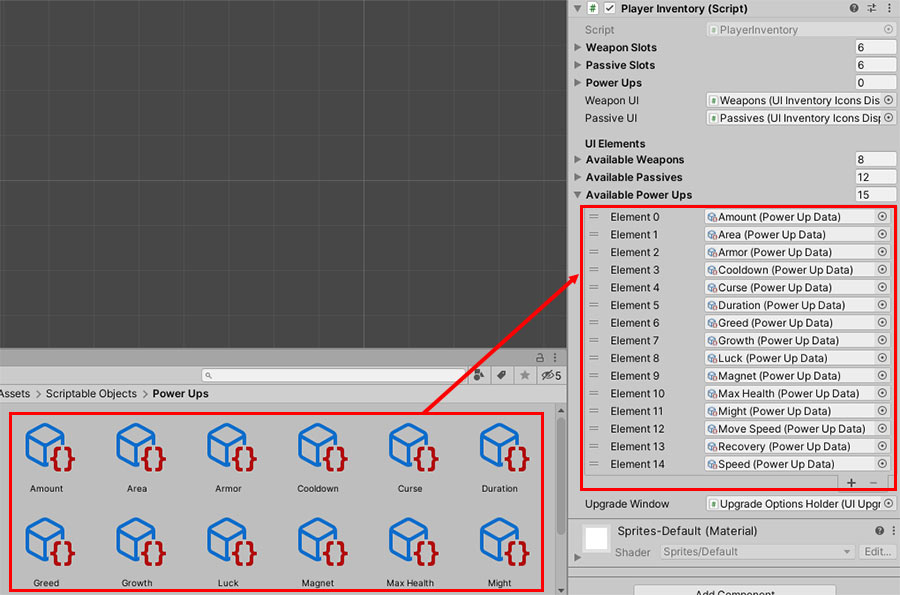
The key additions to the PlayerInventory script are, essentially, the availablePowerUps and powerUps List variables; which store the PowerUpData files that the player has access to, and the currently applied power-ups respectively.
On top of that, overloaded versions of the Add(), Remove() and Get() functions have been added to the class, so that we can create power-ups on the player character itself.
Notice as well, that in the Start() function, a small snippet of code was added to load all the saved power-ups in SaveManager into the player character.
b. Updating PlayerStats to include power-ups
Now that the PlayerInventory is able to track power-ups, we can now update the RecalculateStats() function in PlayerStats to include the player’s equipped power-ups:
PlayerStats.cs
using System;
using System.Collections.Generic;
using UnityEngine;
using UnityEngine.UI;
using TMPro;

public class PlayerStats : EntityStats
{

    CharacterData characterData;
    public CharacterData.Stats baseStats;
    [SerializeField] CharacterData.Stats actualStats;

    public CharacterData.Stats Stats
    {
        get { return actualStats; }
        set
        {
            actualStats = value;
        }
    }
    public CharacterData.Stats Actual
    {
        get { return actualStats; }
    }

    #region Current Stats Properties
    public float CurrentHealth
    {

        get { return health; }

        // If we try and set the current health, the UI interface
        // on the pause screen will also be updated.
        set
        {
            //Check if the value has changed
            if (health != value)
            {
                health = value;
                UpdateHealthBar();
            }
        }
    }
    #endregion

    [Header("Visuals")]
    public ParticleSystem damageEffect; // If damage is dealt.
    public ParticleSystem blockedEffect; // If armor completely blocks damage.

    //Experience and level of the player
    [Header("Experience/Level")]
    public int experience = 0;
    public int level = 1;
    public int experienceCap;


    //Class for defining a level range and the corresponding experience cap increase for that range
    [System.Serializable]
    public class LevelRange
    {
        public int startLevel;
        public int endLevel;
        public int experienceCapIncrease;
    }

    //I-Frames
    [Header("I-Frames")]
    public float invincibilityDuration;
    float invincibilityTimer;
    bool isInvincible;

    public List<LevelRange> levelRanges;

    PlayerInventory inventory;
    PlayerCollector collector;

    [Header("UI")]
    public Image healthBar;
    public Image expBar;
    public TMP_Text levelText;

    PlayerAnimator playerAnimator;
    void Awake()
    {

        characterData = UICharacterSelector.GetData();

        inventory = GetComponent<PlayerInventory>();
        collector = GetComponentInChildren<PlayerCollector>();

        //Assign the variables
        baseStats = actualStats = characterData.stats;
        collector.SetRadius(actualStats.magnet);
        health = actualStats.maxHealth;

        playerAnimator = GetComponent<PlayerAnimator>();
        if(characterData.controller)
            playerAnimator.SetAnimatorController(characterData.controller);
    }

    protected override void Start()
    {
        base.Start();

        // Adds the global buff if there is any.
        if (UILevelSelector.globalBuff && !UILevelSelector.globalBuffAffectsPlayer)
            ApplyBuff(UILevelSelector.globalBuff);

        //Spawn the starting weapon
        inventory.Add(characterData.StartingWeapon);

        //Initialize the experience cap as the first experience cap increase
        experienceCap = levelRanges[0].experienceCapIncrease;

        GameManager.instance.AssignChosenCharacterUI(characterData);

        UpdateHealthBar();
        UpdateExpBar();
        UpdateLevelText();
    }

    protected override void Update()
    {
        base.Update();
        if (invincibilityTimer > 0)
        {
            invincibilityTimer -= Time.deltaTime;
        }
        //If the invincibility timer has reached 0, set the invincibility flag to false
        else if (isInvincible)
        {
            isInvincible = false;
        }

        Recover();
    }

    public override void RecalculateStats()
    {
        actualStats = baseStats;

        foreach (PlayerInventory.Slot s in inventory.passiveSlots)
        {
            Passive p = s.item as Passive;
            if (p)
            {
                actualStats += p.GetBoosts();
            }
        }

        // Add power-up stats from the inventory.
        foreach (PowerUp pow in inventory.powerUps)
        {
            actualStats += pow.GetBoosts();
        }

        // Create a variable to store all the cumulative multiplier values.
        CharacterData.Stats multiplier = new CharacterData.Stats
        {
            maxHealth = 1f,
            recovery = 1f,
            armor = 1f,
            moveSpeed = 1f,
            might = 1f,
            area = 1f,
            speed = 1f,
            duration = 1f,
            amount = 1,
            cooldown = 1f,
            luck = 1f,
            growth = 1f,
            greed = 1f,
            curse = 1f,
            magnet = 1f,
            revival = 1
        };

        foreach (Buff b in activeBuffs)
        {
            BuffData.Stats bd = b.GetData();
            switch (bd.modifierType)
            {
                case BuffData.ModifierType.additive:
                    actualStats += bd.playerModifier;
                    break;
                case BuffData.ModifierType.multiplicative:
                    multiplier *= bd.playerModifier;
                    break;
            }
        }
        actualStats *= multiplier;

        // Update the PlayerCollector's radius.
        collector.SetRadius(actualStats.magnet);
    }

    public void IncreaseExperience(int amount)
    {
        experience += amount;

        LevelUpChecker();
        UpdateExpBar();
    }

    void LevelUpChecker()
    {
        if (experience >= experienceCap)
        {
            //Level up the player and reduce their experience by the experience cap
            level++;
            experience -= experienceCap;

            //Find the experience cap increase for the current level range
            int experienceCapIncrease = 0;
            foreach (LevelRange range in levelRanges)
            {
                if (level >= range.startLevel && level <= range.endLevel)
                {
                    experienceCapIncrease = range.experienceCapIncrease;
                    break;
                }
            }
            experienceCap += experienceCapIncrease;

            UpdateLevelText();

            GameManager.instance.StartLevelUp();

            // If the experience still exceeds the experience cap, level up again.
            if (experience >= experienceCap) LevelUpChecker();
        }
    }

    void UpdateExpBar()
    {
        // Update exp bar fill amount
        expBar.fillAmount = (float)experience / experienceCap;
    }

    void UpdateLevelText()
    {
        // Update level text
        levelText.text = "LV " + level.ToString();
    }

    public override void TakeDamage(float dmg)
    {
        //If the player is not currently invincible, reduce health and start invincibility
        if (!isInvincible)
        {
            // Take armor into account before dealing the damage.
            dmg -= actualStats.armor;

            if (dmg > 0)
            {
                // Deal the damage.
                CurrentHealth -= dmg;

                // If there is a damage effect assigned, play it.
                if (damageEffect) Destroy(Instantiate(damageEffect, transform.position, Quaternion.identity), 5f);

                if (CurrentHealth <= 0)
                {
                    Kill();
                }
            }
            else
            {
                // If there is a blocked effect assigned, play it.
                if (blockedEffect) Destroy(Instantiate(blockedEffect, transform.position, Quaternion.identity), 5f);
            }

            invincibilityTimer = invincibilityDuration;
            isInvincible = true;
        }
    }

    void UpdateHealthBar()
    {
        //Update the health bar
        healthBar.fillAmount = CurrentHealth / actualStats.maxHealth;
    }

    public override void Kill()
    {
        if (!GameManager.instance.isGameOver)
        {
            GameManager.instance.AssignLevelReachedUI(level);

            GameManager.instance.GameOver();
        }
    }

    public override void RestoreHealth(float amount)
    {
        // Only heal the player if their current health is less than their maximum health
        if (CurrentHealth < actualStats.maxHealth)
        {
            CurrentHealth += amount;

            // Make sure the player's health doesn't exceed their maximum health
            if (CurrentHealth > actualStats.maxHealth)
            {
                CurrentHealth = actualStats.maxHealth;
            }
        }
    }

    void Recover()
    {
        if (CurrentHealth < actualStats.maxHealth)
        {
            CurrentHealth += Stats.recovery * Time.deltaTime;

            // Make sure the player's health doesn't exceed their maximum health
            if (CurrentHealth > actualStats.maxHealth)
            {
                CurrentHealth = actualStats.maxHealth;
            }
        }
    }
}
c. Assigning Available Power Ups in PlayerInventory
The last thing you’ll need to do before you can test this out is to assign the Available Power Ups property to the PlayerInventory component in all your Scenes.
5. Updating the coin saving functionality
Remember that in the previous part, we made our game save coins after every run. Because we’ve changed the save system, we’ll need to update the SaveCoinsToStash() function in our PlayerCollector to use Bench.
PlayerCollector.cs
using System.Collections;
using System.Collections.Generic;
using UnityEngine;

[RequireComponent(typeof(Collider2D))]
public class PlayerCollector : MonoBehaviour
{
    PlayerStats player;
    CircleCollider2D detector;
    public float pullSpeed = 10;

    public delegate void OnCoinCollected();
    public OnCoinCollected onCoinCollected;

    float coins;

    void Start()
    {
        player = GetComponentInParent<PlayerStats>();
        coins = 0;
    }

    public void SetRadius(float r)
    {
        if (!detector) detector = GetComponent<CircleCollider2D>();
        detector.radius = r;
    }

    public float GetCoins() { return coins; }

    public float AddCoins(float amount)
    {
        coins += amount;
        onCoinCollected?.Invoke();
        return coins;
    }

    // Saves the collected coins to the save file.
    public void SaveCoinsToStash(bool async)
    {
        SaveManager.LastLoadedGameData.coins += coins;
        SaveManager.Save();
        SaveManager.Instance.SavedData.totalCoins += coins;
        if (async) Bench.SaveGameAsync();
        else Bench.SaveGame();
    }
    public void SaveCoinsToStash() { SaveCoinsToStash(false); }

    public void ResetRunCoins()
    {
        coins = 0;
        onCoinCollected?.Invoke();
    }

    private void OnTriggerEnter2D(Collider2D col)
    {
        if (col.TryGetComponent(out Pickup p))
        {
            p.Collect(player, pullSpeed);
        }
    }
}
We’ll also need to update the UICoinDisplay to retrieve the new totalCoins variable from SaveManager as well, as well as to have the coin display update whenever the player’s coins are updated in the SaveManager (such as when you buy a new power-up).
UICoinDisplay.cs
using TMPro; using UnityEngine; /// <summary> /// Component that is attached to GameObjects to make it display the player's coins. /// Either in-game, or the total number of coins the player has, depending on whether /// the collector variable is set. /// </summary> public class UICoinDisplay : MonoBehaviour { TextMeshProUGUI displayTarget; public PlayerCollector collector; void Start() { displayTarget = GetComponentInChildren<TextMeshProUGUI>(); UpdateDisplay(); if(collector != null) collector.onCoinCollected += UpdateDisplay; if(SaveManager.Instance) SaveManager.Instance.OnCoinsChanged += UpdateDisplay; } public void UpdateDisplay() { // If a collector is assigned, we will display the number of coins the collector has. if (collector != null) { displayTarget.text = Mathf.RoundToInt(collector.GetCoins()).ToString(); } else { // If not, we will get the current number of coins that are saved.float coins = SaveManager.LastLoadedGameData.coins;float coins = SaveManager.Instance.SavedData.totalCoins; displayTarget.text = Mathf.RoundToInt(coins).ToString(); } } }
6. Conclusion
…and we’re done! Silver Patrons can download the project files.