Forum begins after the advertisement:
[Part 2.5] Map generation on ‘roids (greatly improved)
Home › Forums › Video Game Tutorial Series › Creating a Rogue-like Shoot-em Up in Unity › [Part 2.5] Map generation on ‘roids (greatly improved)
- This topic has 5 replies, 2 voices, and was last updated 1 month, 3 weeks ago by
giselle.
-
AuthorPosts
-
December 28, 2025 at 12:20 am #19137::
Hi everyone, over the past week, I have been working on improving the map generation script of this Vampire Survivors series. Although it is working fine by-and-large, there are several issues with it that can make it difficult to use when building your levels.
If you’ve watched our series all the way up to Part 15 and after, you’ll notice that I like building systems that are as simple to use in the Editor as possible. This is because developing a game is already an extremely complex task in itself, and we want to avoid creating systems that make our work harder.
1. Shortcomings of the current
MapControllerThe biggest drawback of the current map generation script is that there is a level of complexity about it that is unnecessary. Because the map generation is dynamic, we create a bunch of terrain chunk prefabs and randomly from select them to spawn on the map. But then, we also depend on manually placed markers around each of our chunk prefab to determine where the next chunk could be.

This introduces a whole bunch of problems, such as (but not limited to):
- If any of the chunk prefabs have a misplaced marker, chunks won’t spawn properly in that direction.
- If any of the chunk prefab markers have a typo in their names (such as the left marker being named “left” instead of “Left”, or if there is a space in the name like ” Right”), chunks also won’t spawn properly in that direction.
- To determine which chunk to check the spawns in, each of the chunks will report to the
MapControllerif the player is in the chunk — this means that if the collider is misconfigured, the detection will not be 100% reliable. - Because the map generation script is tied to the player, map generation doesn’t work if the player character is missing.
As you can see, the robustness of your map generation is highly dependent on your chunk prefab set-up. This means that if multiple people are working on the chunk prefabs, it is extremely likely for some of your chunk prefabs to end up being misconfigured.
Plus, because the
MapControllerrelies on the current tile to generate adjacent tiles, the map doesn’t spawn tiles beyond the one we are on: December 28, 2025 at 12:33 am #19139::
2. The vision
To fix this, we’ll be improving upon the
MapControllerscript drastically, by:- Removing the need to put spawn markers on each of the prefab chunks. This will make configuring each of the chunk prefabs much easier, as we no longer need to bother with manually placing markers.
- Removing the reliance of
MapControlleron the player character. The newMapControllerwill simply use the position of the camera to determine where to spawn chunks, making it much more robust.
Without further ado, here is the new
MapControllercomponent:30 December 2025: This script has been updated to add a new Delete Culled Chunks boolean.
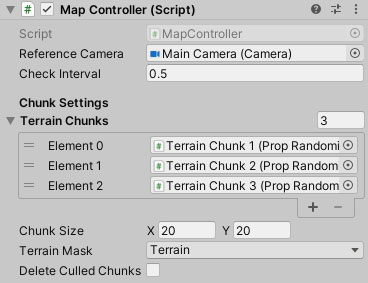
And this is the script for it:
using System.Collections.Generic;
using System.Collections;
using UnityEngine;
using System.Linq;

public class MapController : MonoBehaviour
{

    public Camera referenceCamera;
    public float checkInterval = 0.5f;

    [Header("Chunk Settings")]
    public PropRandomizer[] terrainChunks;
    public Vector2 chunkSize = new Vector2(20f, 20f);
    public LayerMask terrainMask = 1;
    public bool deleteCulledChunks = false;

    // Stores the last camera's position and size.
    // To determine whether we need to do checks.
    Vector3 lastCameraPosition;
    Rect lastCameraRect;
    float cullDistanceSqr;

    void Start()
    {
        // Print out errors when important variables are not assigned.
        if (!referenceCamera)
            Debug.LogError("MapController cannot work without a reference camera.");

        if (terrainChunks.Length < 1)
            Debug.LogError("There are no Terrain Chunks assigned, so the map cannot be dynamically generated.");

        // Begin the map checking coroutine.
        StartCoroutine(HandleMapCheck());
        HandleChunkSpawning(Vector2.zero, true);
    }

    void Reset()
    {
        referenceCamera = Camera.main;
    }

    // Coroutine that runs periodically to check and spawn new map pieces.
    IEnumerator HandleMapCheck()
    {
        for(;;)
        {
            yield return new WaitForSeconds(checkInterval);

            // Only update the map if one of these is true.
            Vector3 moveDelta = referenceCamera.transform.position - lastCameraPosition;
            bool hasCamWidthChanged = !Mathf.Approximately(referenceCamera.pixelWidth - lastCameraRect.width, 0),
                 hasCamHeightChanged = !Mathf.Approximately(referenceCamera.pixelHeight - lastCameraRect.height, 0);

            if (hasCamWidthChanged || hasCamHeightChanged || moveDelta.magnitude > 0.1f) {
                HandleChunkCulling();
                HandleChunkSpawning(moveDelta, true);
            }

            lastCameraPosition = referenceCamera.transform.position;
            lastCameraRect = referenceCamera.pixelRect;
        }
    }

    // Gets a rect that represents the area the camera covers in the game world.
    public Rect GetWorldRectFromViewport()
    {
        if (!referenceCamera)
        {
            Debug.LogError("Reference camera not found. Using Main Camera instead.");
            referenceCamera = Camera.main;
        }

        Vector2 minPoint = referenceCamera.ViewportToWorldPoint(referenceCamera.rect.min),
                maxPoint = referenceCamera.ViewportToWorldPoint(referenceCamera.rect.max);
        Vector2 size = new Vector2(maxPoint.x - minPoint.x, maxPoint.y - minPoint.y);
        cullDistanceSqr = Mathf.Max(size.sqrMagnitude, chunkSize.sqrMagnitude) * 3;

        return new Rect(minPoint, size);
    }

    // Gets all the points we have to check for chunks on.
    public Vector2[] GetCheckedPoints()
    {
        Rect viewArea = GetWorldRectFromViewport();
        Vector2Int tileCount = new Vector2Int(
            (int)Mathf.Ceil(viewArea.width / chunkSize.x) + 1,
            (int)Mathf.Ceil(viewArea.height / chunkSize.y) + 1
        );

        HashSet<Vector2> result = new HashSet<Vector2>();
        for (int y = -1; y < tileCount.y; y++)
        {
            for (int x = -1; x < tileCount.x; x++)
            {
                result.Add(new Vector2(
                    viewArea.min.x + chunkSize.x * x,
                    viewArea.min.y + chunkSize.y * y
                ));
            }
        }

        return result.ToArray();
    }

    void HandleChunkSpawning(Vector2 moveDelta, bool checkWithoutDelta = false)
    {

        HashSet<Vector2> spawnedPositions = new HashSet<Vector2>();
        Vector2 currentPosition = referenceCamera.transform.position;

        // Checks all the viewport points we are interested in.
        foreach (Vector3 vp in GetCheckedPoints())
        {
            if(!checkWithoutDelta) {
                // Only check left / right if we are moving.
                if (moveDelta.x > 0 && vp.x < 0.5f) continue;
                else if (moveDelta.x < 0 && vp.x > 0.5f) continue;

                // Only check up / down if we are moving.
                if (moveDelta.y > 0 && vp.y < 0.5f) continue;
                else if (moveDelta.y < 0 && vp.y > 0.5f) continue;
            }

            // Snaps the checked position to the nearest chunked position.
            Vector3 checkedPosition = SnapPosition(vp);

            // If the position has no chunks, then spawn chunk.
            if (!spawnedPositions.Contains(checkedPosition) && !Physics2D.OverlapPoint(checkedPosition, terrainMask))
                SpawnChunk(checkedPosition);

            spawnedPositions.Add(checkedPosition);
        }
    }

    // Rounds a Vector to the nearest position as given by chunkSize.
    Vector3 SnapPosition(Vector3 position)
    {
        return new Vector3(
            Mathf.Round(position.x / chunkSize.x) * chunkSize.x,
            Mathf.Round(position.y / chunkSize.y) * chunkSize.y,
            transform.position.z
        );
    }

    // Spawns a chunk at a designated position.
    PropRandomizer SpawnChunk(Vector3 spawnPosition, int variant = -1)
    {
        if (terrainChunks.Length < 1) return null;
        int rand = variant < 0 ? Random.Range(0, terrainChunks.Length) : variant;
        PropRandomizer chunk = Instantiate(terrainChunks[rand], transform);
        chunk.transform.position = spawnPosition;
        return chunk;
    }

    // Determines whether a given chunk should be shown or hidden.
    void HandleChunkCulling()
    {
        for(int i = transform.childCount - 1; i >= 0; i--)
        {
            Transform chunk = transform.GetChild(i);
            Vector2 dist = referenceCamera.transform.position - chunk.position;
            bool cull = dist.sqrMagnitude > cullDistanceSqr;
            chunk.gameObject.SetActive(!cull);
            if(deleteCulledChunks && cull) Destroy(chunk.gameObject);
        }
    }
}
December 28, 2025 at 12:47 am #19142::3. How to use the component
The first thing you’ll notice about the component is that it is much more compact. There are fewer properties to configure, making it much easier to configure and use:
- Reference Camera: Replaces the player in the old MapController. The reference camera’s position determines where we will be checking and spawning terrain chunks around, and its viewport (i.e. view area) will be used to determine which parts of the game world need to have chunks spawned.
- Check Interval: Instead of checking spawns every frame, Check Interval will determine how often we check for new chunks to be spawned.
- Terrain Chunks: These are the chunk prefabs that we will randomly pick from when we need to spawn a new chunk. Instead of accepting
GameObject, it now acceptsPropRandomizer— since all terrain chunks have aPropRandomizercomponent attached, this change ensures that the user will only be able to assign terrain chunks here, reducing the risk of errors caused by wrong assignments. - Chunk Size: We set the size of each of our terrain chunks here. This is used by
MapControllerto replace the old markers on our terrain chunks. - Terrain Mask: Same as the old
MapController. We mark the layer(s) that theMapControllerconsiders to be terrain. This is used by the map optimiser to disable chunks that are too far away from the Camera. - Delete Culled Chunks: When a chunk is too far away from the camera, this script automatically hides the chunk. If you want hidden chunks to be automatically deleted, check this option.
To utilise this new
MapControllerscript, simply ensure that suitable terrain prefabs are assigned into Terrain Chunks. Make sure that all these terrain prefabs are the same size, and set Chunk Size to the size of one of these prefabs.The rest of the variables should automatically assign themselves (including the reference camera, which picks the camera in your scene tagged as “Main Camera”).
In all of your terrain prefabs, you can also remove the GameObject containing the Chunk Trigger component, as well as all the markers:
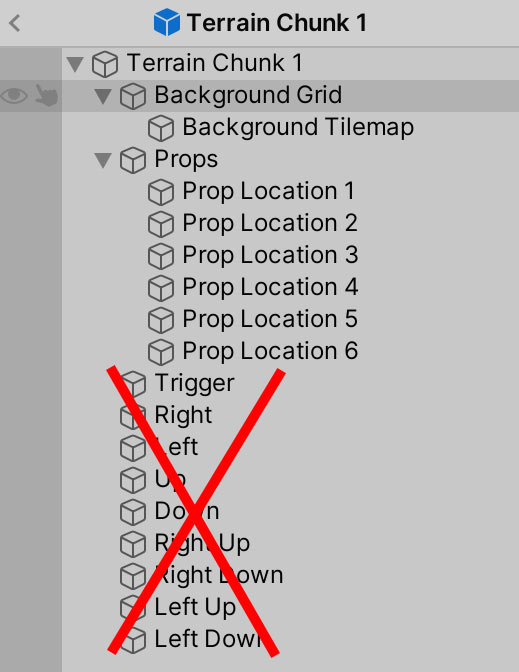 December 30, 2025 at 2:19 pm #19159::
4. Spawned chunks parenting
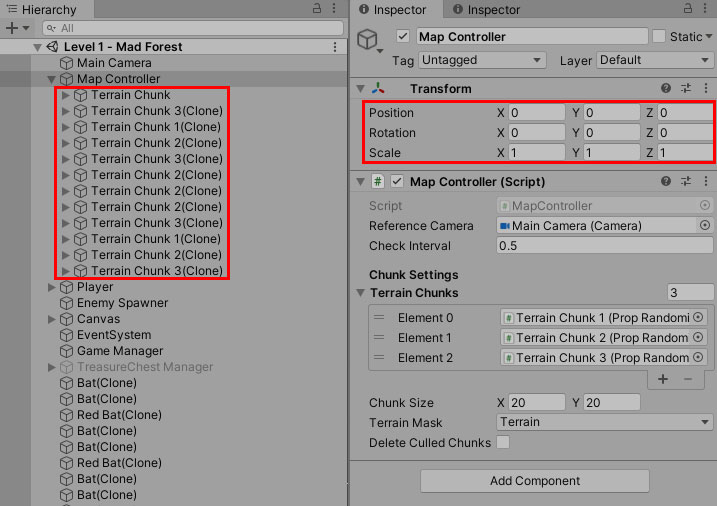
In the new
MapControllerscript, all spawned chunks are parented under the GameObject thatMapControlleris attached to. Hence, ensure that any default chunks you have in your map are parented to it.Also, because the chunks are parented to the Map Controller GameObject, you may want to set its Transform accordingly and ensure that its scale is set to 1.
 December 30, 2025 at 8:47 pm #19161::
5. How does the
MapControllerwork?To understand the
MapControllerscript, the most important function to understand isHandleMapCheck(). This function acts as the manager for the entire system — it decides when the map needs to update, but not how it updates.HandleMapCheck()is implemented as a coroutine that runs continuously at fixed time intervals, controlled by thecheckIntervalvariable.
How
HandleMapCheck()worksHandleMapCheck()runs in an infinite loop and pauses forcheckIntervalseconds between each iteration. On every cycle, it checks whether the camera has changed in a meaningful way since the last update.Specifically, it checks three things:
-
Has the camera moved?
The function compares the camera’s current position to its previous position (lastCameraPosition).
If the camera has moved more than a small threshold, the map may need updating. -
Has the camera size changed?
The function also checks whether the camera’s pixel width or height has changed since the last check.
This accounts for things like:- Window resizing
- Resolution changes
- Aspect ratio changes
-
Should the map be updated?
If any of these conditions are true, the map is updated by calling:HandleChunkCulling()to hide or remove far-away chunksHandleChunkSpawning()to generate new chunks where needed
After the update, the camera’s current position and size are stored so they can be compared again on the next cycle.
This design ensures that the map:
- Only updates when necessary
- Avoids doing expensive checks every frame
- Responds correctly to both camera movement and camera resizing
Why
HandleMapCheck()existsInstead of spawning and culling chunks every frame,
HandleMapCheck()acts as a gatekeeper. It ensures that chunk updates only happen when something has actually changed that could affect what the player sees.This keeps the system:
- Efficient
- Predictable
- Easy to reason about
Once
HandleMapCheck()determines that an update is needed, it delegates the actual work to two functions:HandleChunkSpawning()— responsible for creating missing chunksHandleChunkCulling()— responsible for hiding or deleting distant chunks
The next post explains how these functions work in detail.
December 31, 2025 at 12:10 am #19163::6. Chunk Management Overview
Once
HandleMapCheck()determines that the map needs to be updated, it delegates the actual work to two separate systems:- Chunk spawning, which ensures that all required chunks exist around the camera
- Chunk culling, which ensures that chunks far outside the camera’s view do not remain active
Separating these responsibilities keeps the system modular and easier to reason about. Each system focuses on a single task and can be modified or optimized independently.
How
HandleChunkSpawning()worksHandleChunkSpawning()is responsible for ensuring that the area around the camera is always filled with terrain chunks.Determining which positions to check
The function begins by calling
GetCheckedPoints(), which returns a grid of world-space positions that fully cover — and slightly exceed — the camera’s current visible area. Spawning 1 tile outside of the camera’s view ensures that chunks are already in place before they become visible.void HandleChunkSpawning(Vector2 moveDelta, bool checkWithoutDelta = false) { HashSet<Vector2> spawnedPositions = new HashSet<Vector2>(); Vector2 currentPosition = referenceCamera.transform.position; // Checks all the viewport points we are interested in. foreach (Vector3 vp in GetCheckedPoints()) { ...These positions represent all chunk locations that should exist at the current moment.
Snapping positions to the chunk grid
Each position returned by
GetCheckedPoints()is passed throughSnapPosition(), which rounds it to the nearest multiple ofchunkSize.Vector3 SnapPosition(Vector3 position) { return new Vector3( Mathf.Round(position.x / chunkSize.x) * chunkSize.x, Mathf.Round(position.y / chunkSize.y) * chunkSize.y, transform.position.z ); }This guarantees that:
- All chunks align perfectly on a grid
- The same chunk position is never represented by slightly different floating-point values
- Chunks can be reliably checked, spawned, and culled
Avoiding duplicate checks
Because multiple checked points may snap to the same grid position,
HandleChunkSpawning()uses aHashSet<Vector2>calledspawnedPositionsto track which snapped positions have already been processed during the current update cycle.void HandleChunkSpawning(Vector2 moveDelta, bool checkWithoutDelta = false) { HashSet<Vector2> spawnedPositions = new HashSet<Vector2>(); Vector2 currentPosition = referenceCamera.transform.position; ...This ensures that each chunk position is evaluated only once per pass.
Checking for existing chunks
Before spawning a new chunk, the function performs a
Physics2D.OverlapPointcheck usingterrainMask.- If a collider is found at the snapped position, a chunk already exists and no action is taken
- If no collider is found, the position is considered empty and eligible for spawning
void HandleChunkSpawning(Vector2 moveDelta, bool checkWithoutDelta = false)
{
    ...

    if (!Physics2D.OverlapPoint(checkedPosition, terrainMask))
    {
        SpawnChunk(checkedPosition);
    }

    ...
}
The
checkWithoutDeltaoptimisationHandleChunkSpawning()receives amoveDeltaparameter that represents how the camera has moved since the previous update.When
checkWithoutDeltais set tofalse, the function uses this value to limit which positions are checked:- If the camera moved right, only positions to the right are checked
- If the camera moved up, only positions above are checked
- Positions behind the camera’s movement direction are skipped
void HandleChunkSpawning(Vector2 moveDelta, bool checkWithoutDelta = false)
{
    ...

    foreach (Vector3 vp in GetCheckedPoints())
    {
        if (!checkWithoutDelta)
        {
            // Horizontal movement filtering
            if (moveDelta.x > 0 && vp.x < 0.5f) continue;
            if (moveDelta.x < 0 && vp.x > 0.5f) continue;

            // Vertical movement filtering
            if (moveDelta.y > 0 && vp.y < 0.5f) continue;
            if (moveDelta.y < 0 && vp.y > 0.5f) continue;
        }

        ...
    }
}
This optimisation significantly reduces the number of checks performed per update while the camera is moving.
When the map is first initialized, or when the camera’s size changes,
checkWithoutDeltais set totrueso that all relevant positions are checked.
Spawning new chunks
If a snapped position:
- Has not already been processed this cycle
- Does not contain an existing chunk
Then
SpawnChunk()is called.This function:
- Selects a random prefab from
terrainChunks - Instantiates it as a child of the
MapController - Places it at the snapped grid position
PropRandomizer SpawnChunk(Vector3 spawnPosition, int variant = -1)
    {
        if (terrainChunks.Length < 1) return null;
        int rand = variant < 0 ? Random.Range(0, terrainChunks.Length) : variant;
        PropRandomizer chunk = Instantiate(terrainChunks[rand], transform);
        chunk.transform.position = spawnPosition;
        return chunk;
    }
By repeating this process at fixed intervals, the map continuously expands around the camera as it moves.
How
HandleChunkCulling()worksWhile chunk spawning ensures the world grows as needed,
HandleChunkCulling()ensures that unused chunks do not remain active indefinitely.Distance-based culling
HandleChunkCulling()iterates through every chunk parented under theMapControllerand calculates its distance from the camera.A chunk is considered out of range if its squared distance from the camera exceeds
cullDistanceSqr, which is calculated dynamically based on:- The camera’s current world-space size
- The configured chunk size
void HandleChunkCulling()
    {
        for(int i = transform.childCount - 1; i >= 0; i--)
        {
            Transform chunk = transform.GetChild(i);
            Vector2 dist = referenceCamera.transform.position - chunk.position;
            bool cull = dist.sqrMagnitude > cullDistanceSqr;
            chunk.gameObject.SetActive(!cull);
            if(deleteCulledChunks && cull) Destroy(chunk.gameObject);
        }
    }
This ensures that chunks are only culled once they are safely outside the visible and near-visible area.
Hiding vs deleting chunks
If a chunk is out of range:
- It is deactivated using
SetActive(false) - If
deleteCulledChunksis enabled, it is permanently destroyed instead
void HandleChunkCulling()
    {
        for(int i = transform.childCount - 1; i >= 0; i--)
        {
            Transform chunk = transform.GetChild(i);
            Vector2 dist = referenceCamera.transform.position - chunk.position;
            bool cull = dist.sqrMagnitude > cullDistanceSqr;
            chunk.gameObject.SetActive(!cull);
            if(deleteCulledChunks && cull) Destroy(chunk.gameObject);
        }
    }
If a hidden chunk comes back within range, it is simply reactivated.
This allows you to choose between:
- Faster reactivation (hide/show), or
- Lower memory usage (destroy/recreate)
Putting it all together
At runtime, the system behaves as follows:
HandleMapCheck()periodically checks for meaningful camera changes- When needed, it culls distant chunks
- It then spawns new chunks around the camera
- The player experiences a seamless, seemingly infinite world
This design keeps the system efficient, scalable, and easy to extend, while remaining entirely driven by the camera’s position and view.
-
AuthorPosts


- You must be logged in to reply to this topic.
Advertisement below: